
Every member their own credit
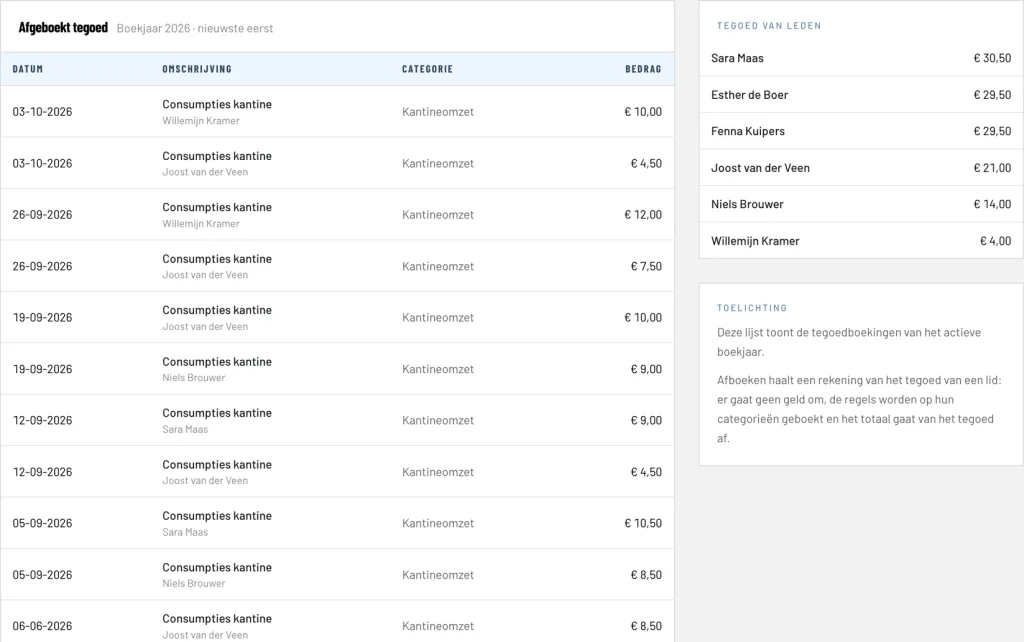
As soon as a member gets credit for the first time, ClubBalans creates a credit account for them, for example Tegoed Jan de Vries (Dutch for credit). There is nothing for you to set up. The overview shows the credit of every member, the largest first, and every credit account lists all its bookings.
In the settings you decide who may have credit: private members, company members, or both. For example, you can let only sponsors and businesses work with credit.
Topping up credit
There are two ways to build up credit:
- Cash in the register: the member hands money to the bar or the treasurer. You choose the member, the register and the amount, and the money is in the register and on the credit straight away.
- Through an invoice: on a regular invoice you choose Credit balance for a line instead of an income category. The amount goes onto the credit of the member, who pays the invoice by bank like any other invoice. Useful for sponsors who pay a large amount in advance, or for a fixed top-up at the start of the season.
Spending at the bar
When a member orders, you deduct the amount from their credit. You split the bill over the categories it belongs to, such as drinks, food or canteen revenue, just like a receipt in the cash register, except that no money goes through the register. The revenue of the bar ends up in the right place in the profit and loss, whether it was paid in cash or with credit.
If the credit is not enough, ClubBalans refuses the spending and shows how much is left. Credit can never drop below zero.
Paying invoices with credit
When a member has credit and an open invoice, the invoice shows it. With Settle with credit you pay the invoice, in full or in part, from the credit. If you made a mistake, you undo the settlement as long as the financial year is active.
It also works the other way round. When you create a credit note for an invoice that was already paid, ClubBalans puts the overpaid amount on the credit of the member automatically. No need to transfer money back: the member simply spends it at the bar or on the next invoice.
Membership fee paid with credit automatically
Do you want members to pay their membership fee with their credit? Switch it on in the settings, again separately for private and company members. When you collect the membership fees you see for every member whether the invoice is paid with credit. That only happens when the credit covers the whole invoice; part of the credit is never used automatically. The member still receives the invoice by email, marked as paid.
Always right in the bookkeeping
Every top-up, spending and settlement is booked straight away. The total of all credit is shown on the balance sheet as a debt of the club to its members: the money is in, but the drinks still have to be poured. Next to the open invoices, the statement of a member also shows their credit with the club.
Changes and deletions are only possible while the financial year is active, and a top-up of which part has been spent can no longer be withdrawn. Every change is recorded in the change log, so the audit committee can see exactly what happened.
The bar committee at work
Credit is a screen of its own in the permissions per role. Give the bar committee access to topping up and spending credit, without letting them see or change the rest of the bookkeeping.